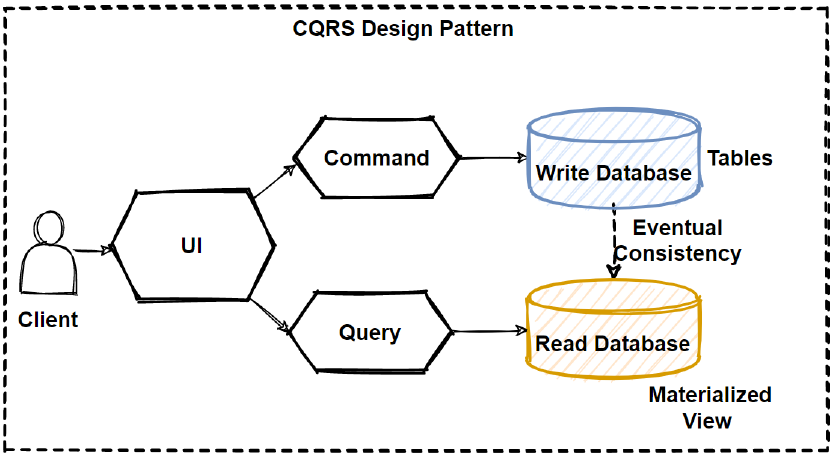
CQRS (Command Query Responsibility Segregation) is an architecture pattern that separates data-modifying operations and data-reading operations into two distinct paths.
- Command → operations that change state/data (Create, Update, Delete).
- Query → operations that only read data.
Without CQRS
Typically, a single service/repository handles everything:
public class UserService
{
    public User GetById(int id) { ... }
    public void Create(User user) { ... }
    public void Update(User user) { ... }
    public void Delete(int id) { ... }
}
With CQRS
Commands and Queries are separated:
// Command
public record CreateUserCommand(
    string Name,
    string Email
);

// Query
public record GetUserByIdQuery(
    int Id
);
Each has its own handler:
public class CreateUserCommandHandler
{
    public async Task Handle(CreateUserCommand command)
    {
        // insert into database
    }
}

public class GetUserByIdQueryHandler
{
    public async Task<UserDto> Handle(GetUserByIdQuery query)
    {
        // read data
    }
}
Example in ASP.NET Core + MediatR
Command:
public record CreateUserCommand(
    string Name,
    string Email
) : IRequest<int>;
Handler:
public class CreateUserCommandHandler
    : IRequestHandler<CreateUserCommand, int>
{
    public async Task<int> Handle(
        CreateUserCommand request,
        CancellationToken cancellationToken)
    {
        // save user
        return user.Id;
    }
}
Query:
public record GetUserQuery(int Id)
    : IRequest<UserDto>;
Handler:
public class GetUserQueryHandler
    : IRequestHandler<GetUserQuery, UserDto>
{
    public async Task<UserDto> Handle(
        GetUserQuery request,
        CancellationToken cancellationToken)
    {
        // read user
    }
}
Controller:
[HttpGet("{id}")]
public async Task<UserDto> Get(int id)
{
    return await _mediator.Send(
        new GetUserQuery(id));
}

[HttpPost]
public async Task<int> Create(
    CreateUserCommand command)
{
    return await _mediator.Send(command);
}
Pros
- Code is more structured.
- Read and write logic don't get mixed up.
- Queries can be optimized specifically for reading.
- Great fit for complex applications.
- Easy to add pipelines like logging, validation, and authorization.
Cons
- Increases the number of files and complexity.
- Overkill for simple CRUD applications.
- Requires discipline in separating commands and queries.
When to use CQRS?
Use it when:
- The application is growing in size.
- Business logic is complex.
- You have many different queries for various UI needs.
- The team is large enough that separation of concerns helps.
Avoid it when:
- It's just a simple CRUD application.
- It's a small project with minimal business logic.